Showing posts with label TUTORIALS. Show all posts

Sunday, May 15, 2016

How to Add Folders on the Navigation Bar (Easy Tutorial #1)


Most of my work is done on my desktop computer. As expected, those thousands of files are sorted by folders which also has its own subfolders. At the beginning, I find it really annoying and time-consuming to rifle through all these folders, sometimes you have to start from the parent folder till you get to your target file after a dozen clicks or so. Finally I was able to find a quick solution for this dilemma by creating shortcuts on the navigation bar.

Step 1: Highlight the folder (could be the folder/folders that you frequently use) that you want to add to your Favorites menu.


Step 2: Open the selected folder. As on the screenshot below, I selected the "-SCRAPBOOKING-" as an example.

Step 3: Right click on "Favorites" on the navigation bar.

Step 4: Simply click on "add current location to Favorites" and you're done!


Wednesday, March 16, 2016

5 PC Apps That Really Makes Life Easier

If you spend a lot of time on your computer daily, these are the best apps I recommend:


1. RAINMETER
Best for beginners. If this is your first time to do any customization on your computer, then Rainmeter is the one for you. Installation is as easy as 1-2-3, you don't have to touch any sensitive system files so you don't have to fear of bricking your computer. It also has thousands of themes that you can chose from.


https://www.rainmeter.net/

2. ROCKETDOCK
It's like having an IOS docklet on your pc. All your favorite applications is just one click away


http://getintopc.com/tutorials/how-to-use-rocketdock/

3. CLOVER
One of my favorites. Open windows are arranged as tabs for easier navigation.

http://www.softwarecrew.com/2012/10/clover-brings-integrated-tabs-to-windows-explorer/
4. TERA COPY
Twice the speed of your regular Windows copy.


http://filehippo.com/download_teracopy/

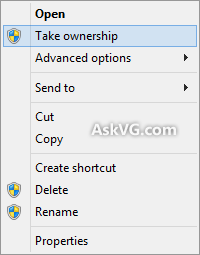
5. TAKE OWNERSHIP 
Best for those who are fond of customizing your computer. This will enable you to have full rights on your system folders. You can now delete or rename system folders & files with this. 


http://www.askvg.com/add-take-ownership-option-in-file-folder-context-menu-in-windows-vista/